REST, or REpresentational State Transfer, is an architectural style for designing networked applications. It is not a formal protocol or standard, but rather a set of architectural principles and constraints for building scalable, stateless, and reliable distributed systems. When a system conforms to these constraints, it is considered “RESTful.”
Defined by Roy Fielding in his 2000 doctoral dissertation, REST has become the de facto standard for building web services and APIs, leveraging the existing and proven infrastructure of the web, most notably the HTTP protocol. While technically format-agnostic, the vast majority of modern REST APIs use JSON (JavaScript Object Notation) as the data format for representations.
The Six Guiding Constraints of REST
For an architecture to be truly RESTful, it must adhere to six fundamental constraints. These are not rules to be followed blindly, but principles that lead to a well-designed, scalable, and decoupled system.
-
Client-Server Architecture: This enforces a strict separation of concerns. The client (the consumer of the data) is decoupled from the server (the manager of the resources). The client handles the user interface and experience, while the server manages the data and business logic. They evolve independently, as long as the interface contract is maintained, often through a clear API Versioning strategy.
-
Statelessness: Every request from a client to the server must be self-contained. The server must not store any client context or session state between requests. All necessary information to process the request (like authentication tokens or versioning information) must be provided by the client. This constraint is a key enabler for scalability, as any server instance can handle any client request.
-
Cacheability: To improve performance and reduce network traffic, responses must explicitly define themselves as cacheable or non-cacheable. This allows clients and intermediaries (like CDNs or proxies) to store and reuse responses, avoiding redundant requests to the server. This is typically managed via HTTP headers like
Cache-Control. -
Layered System: The architecture can be composed of multiple layers of servers (e.g., proxies, gateways, load balancers). A client, however, connects to a single endpoint and has no visibility into the underlying layers. This allows for architectural flexibility, such as offloading security or applying load balancing, without affecting the client.
-
Uniform Interface: This is the central principle of REST, simplifying and decoupling the architecture. It promotes a single, consistent way of interacting with the system, regardless of the resource type. This constraint is broken down into four sub-constraints explained in the next section.
-
Code on Demand (Optional): This is the only optional constraint. It allows a server to extend the functionality of a client by sending executable code (e.g., JavaScript). This is most commonly seen in web browsers rendering a web page.
The Uniform Interface in Detail
The power of REST lies in its uniform interface, which dictates how clients interact with resources.
-
Identification of Resources: Every resource must be uniquely and consistently identified by a stable identifier. In web-based REST systems, this is the Uniform Resource Identifier (URI).
- Example:
/users/123is the URI that uniquely identifies a specific user.
- Example:
-
Manipulation of Resources Through Representations: The client interacts with a resource through its representation. While XML and other formats are possible, JSON is the most common choice for modern APIs. To avoid ambiguity and endless debates over structuring these JSON payloads, specifications like JSON:API provide a standardized convention.
- Example: To update a user’s name, a client would
PUTa modified JSON representation of that user to the/users/123URI.
- Example: To update a user’s name, a client would
-
Self-Descriptive Messages: Each message contains enough information for the receiver to understand and process it. This is achieved through the structure of the request and response, including verbs, status codes, and headers.
-
Hypermedia as the Engine of Application State (HATEOAS): This is the most mature, yet often overlooked, aspect of REST. It means that a client should be able to navigate the API by following links provided in the server’s responses. The server’s response contains not just the data, but also the possible next actions (as links), decoupling the client from hardcoded URIs.
Anatomy of a RESTful Request
A key part of the uniform interface is the consistent structure of messages. A standard HTTP request, as used by REST, is composed of four main parts:
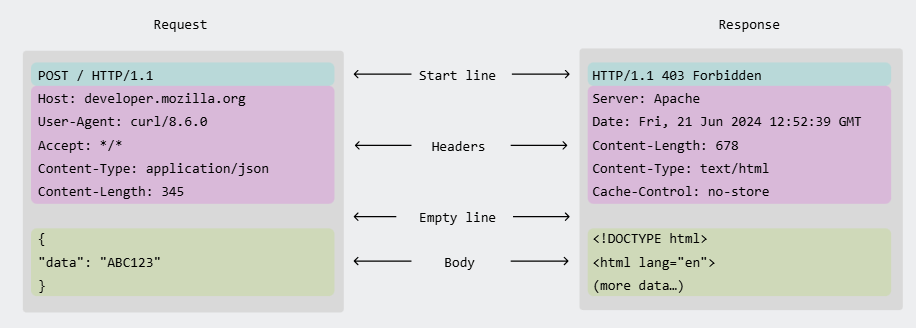 Image credit: Mozilla Developer Network
- Method (or Verb): The action to be performed on the resource. The most common HTTP Verbs are
GET(read),POST(create),PUT(update/replace),DELETE(remove), andPATCH(partially update). - Path: The URI that uniquely identifies the resource the action is being performed on (e.g.,
/users/123). - Headers: Key-value pairs that provide metadata about the request. This includes headers for Content Negotiation like
Content-TypeandAccept, as well as others for authentication (Authorization) or caching. - Body (or Payload): The data for the resource, typically included in
POST,PUT, andPATCHrequests. It is almost always formatted in JSON for modern APIs, though XML is also seen in legacy systems.
Securing REST APIs
REST does not prescribe a specific security mechanism, but its stateless nature makes it highly compatible with token-based authentication strategies. Because each request must be self-contained, sending a security token in the Authorization header is the most common approach.
- Bearer Tokens: The most popular method involves the client obtaining a bearer token (such as a JWT) from an authentication server. The client then sends this token in the
Authorizationheader with every request (e.g.,Authorization: Bearer <token>). - API Keys: For simpler service-to-service communication, a static API key can be used.
- OAuth 2.0: This framework is often used to allow third-party applications to access an API on behalf of a user. It provides different flows for obtaining access tokens.
The specific security mechanisms for a REST API can be formally defined using the securitySchemes object in an OpenAPI specification. When consumed by browser-based clients from a different origin, REST APIs must also have a proper CORS policy.
Common Practices
Using HTTP Status Codes
Using standard HTTP Status Codes is a core part of a self-descriptive message. They immediately convey the outcome of a request.
- 2xx (Success): The request was successful.
200 OK: Standard success response.201 Created: A new resource was successfully created (e.g., after aPOST).204 No Content: The request was successful, but there is no content to return (e.g., after aDELETE).
- 3xx (Redirection): Further action needs to be taken.
301 Moved Permanently: The resource has been moved to a new URI.
- 4xx (Client Error): The request contains bad syntax or cannot be fulfilled.
400 Bad Request: The server cannot process the request due to a client error (e.g., malformed JSON).401 Unauthorized: The client must authenticate itself.403 Forbidden: The client is authenticated but does not have permission.404 Not Found: The requested resource could not be found.
- 5xx (Server Error): The server failed to fulfill a valid request.
500 Internal Server Error: A generic error message for an unexpected condition.
Using Query Parameters
Query parameters are used to filter, sort, and paginate collections of resources. This is a core HTTP feature that REST leverages extensively. For a detailed explanation of how query parameters work, see the main documentation on Resource Addressing in HTTP.
- Filtering:
GET /users?status=active - Sorting:
GET /users?sort=-created_at(descending order) - Pagination:
GET /users?page=2&limit=50 - Searching:
GET /users?q=john
sequenceDiagram
    participant Client
    participant Server
    Client->>Server: GET /users/123
    Server-->>Client: 200 OK { "id": 123, "name": "John Doe", "_links": { "self": { "href": "/users/123" },    "orders": { "href": "/users/123/orders" }}}
    Note over Client, Server: Client can now discover the user's orders via the _links section.
Description: A client requests a user resource. The server responds with the user’s data and HATEOAS links, allowing the client to discover related resources dynamically.
Resource-Oriented Design: URI Naming and Structure
A core principle of REST is designing the API around resources (the “nouns” of your system). This is achieved by giving each resource a unique address using a Uniform Resource Identifier (URI). While the mechanics of URIs (including path and query parameters) are a general feature of HTTP, REST applies a specific philosophy to their design.
This resource-oriented approach is one of the biggest conceptual shifts for developers accustomed to RPC-style systems.
- RPC-style (Action-oriented):
POST /createUser,POST /updateUser,POST /getUser - REST-style (Resource-oriented):
POST /users,PUT /users/{id},GET /users/{id}
If you find yourself adding verbs to your URIs (e.g., getUsers, updateOrder), it is a strong indicator that you are deviating from a RESTful design.
URI Naming Conventions
Well-designed URIs are intuitive and easy to understand. They act as a form of documentation for the API.
-
Use Nouns, Not Verbs: URIs should identify resources, and resources are nouns. The action is conveyed by the HTTP method.
- Good:
/users,/orders/{orderId} - Bad:
/getUsers,/updateOrder/{orderId}
- Good:
-
Use Plural Nouns for Collections: To maintain consistency, use plural nouns for all collection-level resources.
- Good:
/users(a collection of users),/users/123(a specific user within the collection) - Acceptable but less consistent:
/user(collection),/user/123(specific user)
- Good:
-
Use Hierarchy to Show Relationships: A URI’s path hierarchy should reflect the relationships between resources.
GET /customers/123/orders: Retrieves all orders for customer123.GET /customers/123/orders/456: Retrieves order456belonging to customer123.
-
Use Hyphens for Readability: To make URIs with multiple words easy to scan, use hyphens (
-) to separate words. Avoid underscores (_) or camelCase.- Good:
/service-requests/{requestId}/error-logs - Bad:
/service_requests/{requestId}/error_logs
- Good:
graph LR
    subgraph URI Structure & Description
        V[/api/v1\] -- Version --> C[/users\]
        C -- Collection --> R[/123\]
        R -- Specific Resource --> RL[/orders\]
    end

    style V fill:#ff99ff,stroke:#333,stroke-width:2px,color:#000
    style C fill:#9999ff,stroke:#333,stroke-width:2px,color:#000
    style R fill:#ff6666,stroke:#333,stroke-width:2px,color:#000
    style RL fill:#66cc66,stroke:#333,stroke-width:2px,color:#000

    V("**/api/v1**<br/>(Version)")
    C("**/users**<br/>(Collection)")
    R("**/123**<br/>(Specific Resource: user 123)")
    RL("**/orders**<br/>(Related Collection: orders)")
Description: A well-structured URI clearly shows the API version, the primary resource collection, a specific item in that collection, and any related resources.
Handling Non-Resource Actions
Sometimes, an action doesn’t naturally map to a standard CRUD operation on a resource. For example, “sending a password reset email.” Instead of creating an action-based URI like /users/123/send-password-reset, the RESTful approach is to model the action itself as a resource.
- Action as a resource:
POST /password-resets - Request Body:
{ "email": "user@example.com" }
In this model, the POST request creates a new password-reset resource. The server handles the side effect (sending the email) as part of the resource creation process.
Mapping CRUD Operations to HTTP Methods
REST leverages standard HTTP methods to perform CRUD (Create, Read, Update, Delete) operations on resources. This provides a uniform and predictable way to interact with the API.
| CRUD Operation | HTTP Method | URI Example | Description |
|---|---|---|---|
| Create | POST | /users | Creates a new resource in a collection. The server typically assigns the new resource ID. Not idempotent. |
| Read | GET | /users, /users/123 | Retrieves a representation of one or more resources. Idempotent and safe (no side effects). |
| Update | PUT / PATCH | /users/123 | PUT replaces the entire resource with the provided representation. PATCH applies a partial update. PUT is idempotent, PATCH may not be. |
| Delete | DELETE | /users/123 | Removes a resource. Idempotent. |
Examples
Create (POST)
Creates a new user. The server generates the ID.
- Request:
POST /users - Body:
{ "name": "John Doe", "email": "john.doe@example.com" } - Response:
201 Createdwith aLocationheader pointing to the new resource (e.g.,Location: /users/124).
Read (GET)
Reads a list of users or a single user.
- Request (List):
GET /users - Response:
200 OKwith a JSON array of user objects. - Request (Single):
GET /users/124 - Response:
200 OKwith the JSON object for user124.
Update (PUT vs. PATCH)
-
PUT (Full Update): Replaces the entire user resource. If you omit a field (e.g.,
email), it may be set to null or a default value.- Request:
PUT /users/124 - Body:
{ "name": "Johnathan Doe", "email": "jon.doe@example.com" } - Response:
200 OK
- Request:
-
PATCH (Partial Update): Updates only the specified fields.
- Request:
PATCH /users/124 - Body:
{ "name": "John Doe" }(email remains unchanged) - Response:
200 OK
- Request:
Delete (DELETE)
Removes a user.
- Request:
DELETE /users/124 - Response:
204 No Content(Success, but no body is returned).
Advantages of REST
- Decoupling: The separation of client and server and the uniform interface allow them to evolve independently.
- Scalability: Statelessness simplifies server design and makes horizontal scaling straightforward.
- Simplicity & Visibility: A uniform interface makes the system easier to understand and its interactions visible and transparent.
- Leverages Web Standards: It uses the proven and ubiquitous infrastructure of the web (HTTP, URIs, caching).
- Cacheability: Leverages the native caching capabilities of HTTP, allowing responses to be cached by clients and intermediaries, which significantly improves performance and scalability.
Disadvantages of REST
- Over-fetching and Under-fetching: A client may receive more data than it needs (over-fetching) or may have to make multiple requests to get all the data it needs (under-fetching). This is a primary problem that GraphQL aims to solve.
- Chattiness: The need for multiple requests to retrieve related resources can lead to increased network traffic.
- Performance: For complex queries or high-performance scenarios between internal services, the overhead of HTTP and text-based formats like JSON can be a bottleneck compared to binary protocols used in frameworks like gRPC.
- Rigid Hierarchy: Resources are often structured in a rigid hierarchy, which may not be ideal for all data models.
Resources & Links
Articles
-
RESTful API Principles A comprehensive resource that covers the principles, constraints, and best practices of building RESTful APIs.
-
Roy Fielding’s Dissertation: Architectural Styles and the Design of Network-based Software Architectures The original source where REST was defined. A must-read for a deep understanding of the principles.
-
What is REST - Codecademy A beginner-friendly introduction to the concepts of REST.
Videos
-
What is a REST API? A video explaining the fundamentals of REST APIs, how they work, and why they are so widely used for web services.
-
REST API Crash Course A crash course for beginners on what REST APIs are and how to use them.